
How to Deposit and Withdraw at CK666 – Step-by-Step Guide
CK666 offers multiple deposit and withdrawal methods. Each method has separate instructions — simply follow the steps to complete your transaction. Deposit processing time is usually 3 to 5 minutes. Start your transaction now!
How to Deposit at CK666
💚 Step 1: Log in to the site. Select the “Deposit” option from the account management section.
💚 Step 2: The deposit interface will open. Choose your preferred payment method and payment channel.
💚 Step 3: Enter the deposit amount. The minimum deposit per transaction is 100 Taka and the maximum is 50,000 Taka.
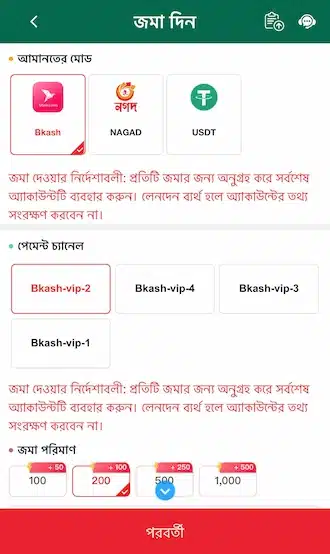
💚 Step 4: The system will show the deposit details. Open the account and make the payment.
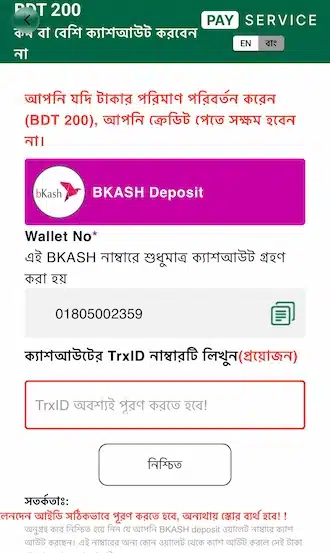
💚 Step 5: After the payment is completed, return to the deposit interface. Enter the correct TrxID code and submit it. Wait until the balance is updated.
Common Mistakes During Deposit

1. Not Entering the Transaction Code
A deposit is completed in two steps. Step 1: Send the money to the company’s Bkash/Nagad account. Step 2: Return to the deposit interface, enter the transaction code/reference number, and submit the request.
⚠️ If you do not enter the transaction code, the balance will not be credited to your account.
2. Entering or Sending the Wrong Amount
Send the money according to the amount shown on the deposit slip. CK666 will not be responsible if money is lost due to incorrect information.
3. Depositing Less Than 100 Taka
The minimum deposit amount is 100 Taka. If you send less than 100 Taka, the deposit request cannot be submitted.
4. Not Entering the Transaction Code Correctly
The transaction code and reference number are the same thing. Rocket codes have 10 digits. Bkash and Nagad codes are made up of a mix of letters and numbers.
Copy the code from the deposit slip and enter it in the reference number field of the deposit form. Make sure to enter the number zero (0) and all letters correctly.
How to Withdraw from CK666
💚 Step 1: Log in to the site. Go to the “Withdraw” option from the account management section.
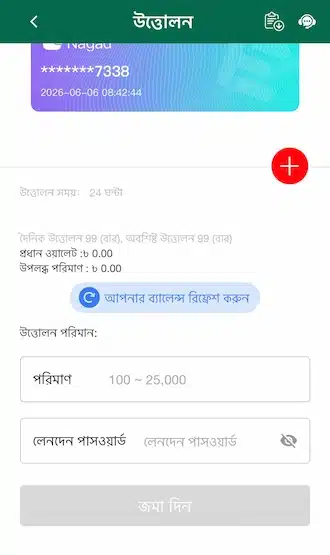
💚 Step 2: In the withdrawal interface, click the plus (+) icon and add your withdrawal account information.
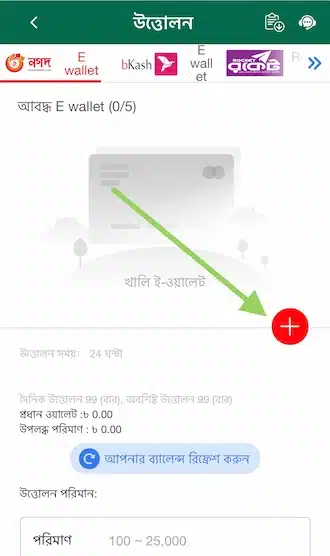
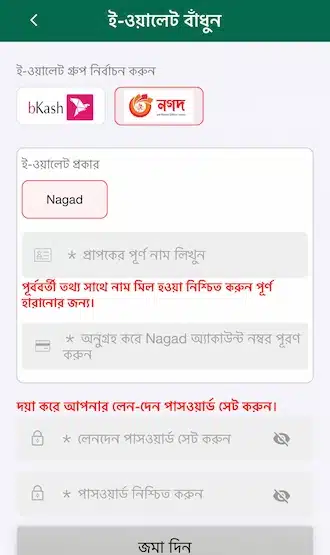
💚 Step 3: Choose a bank or e-wallet. Enter the account holder’s name and account number.
💚 Step 4: For your first withdrawal, create a 6-digit withdrawal password. Enter the password again to confirm it.
💚 Step 5: Return to the withdrawal interface. Before withdrawing, transfer your balance to the main wallet.
💚 Step 6: Enter the withdrawal amount. The minimum withdrawal per transaction is 100 Taka and the maximum is 50,000 Taka.
💚 Step 7: Check all information and submit the withdrawal request. It will be processed within 5–10 minutes.
Important Withdrawal Information
🎋 Each withdrawal transaction takes 15 to 30 minutes to process.
🎋 The minimum withdrawal amount is 100 Taka and the maximum is 50,000 Taka. You must withdraw within this limit.
🎋 There is no limit on the number of withdrawals per day.
🎋 To withdraw money received from a bonus, you must meet the terms and conditions stated in the promotion.
🎋 Withdrawals can be made through both local banks and e-wallets.